
Less Friction. More productivity
Introduction
If you’re running a static blog with Zola, you know the drill: create a markdown file, add the frontmatter, remember the correct TOML format, generate a slug from the title, put it in the proper directory, commit, build, and push.
It’s not complicated, but it’s friction. And the last thing I need nowadays is friction: I have a lot of high-priority, high-impact tasks, and I seldom find enough time to create a blog post. So, even when I exactly know what to post, I procrastinate due to the very thought of “organizing” stuff.
So, I wanted to make my blogging as frictionless as possible. Just run a command, answer a few questions, and start writing: No context switching, no remembering file formats, no manual slug generation.
Here is my current workflow:
How Things Were Before
Every time I wanted to write a blog post, I had to:
- Manually create a markdown file with the correct naming convention
- Copy-paste the TOML frontmatter template
- Remember which category to put it in
- Manually generate a URL-friendly slug from the title
- Format tags correctly
- Remember the date format
- Build with Zola
- Commit and push to deploy
That’s too many steps. The barrier to entry was high enough that I’d almost always skip writing altogether.
Let’s Hack This
So, I created a simple Makefile with a shell script that handles everything interactively. Now the workflow is:
make new    # Create a new post
make serve  # Preview locally
make deploy # Build and push to production
That’s it. Three commands for the entire workflow.
Creating New Posts
The make new command runs an interactive script that:
- Asks for a title: And I just type naturally
- Shows category descriptions: So I know where it belongs
- Prompts for tags: Comma-separated, parsed automatically
- Generates everything: Slug, frontmatter, file structure
Here’s what the interaction looks like for this very blog post:
$ make new
Creating a new blog post...

Title: A Frictionless Blog Workflow

Available categories:
  1) top-of-mind    - Random thoughts and musings (brain dump)
  2) inbox          - General content (default)
  3) highlights     - Leadership and non-technical aspects
  4) tips           - Useful tips, tricks, and code snippets
  5) roadmap        - Career guidance, resources, life lessons
  6) zero-to-prod   - Production-ready system tutorials
  7) spire          - SPIFFE and SPIRE articles
Choose category (1-7) [default: 2]: 4

Tags (comma-separated): blogging, workflow, content-creation

Created: /Users/volkan/<truncated...>/a-frictionless-blog-workflow.md
The script automatically:
- Converts the title to a URL-friendly slug (
a-frictionless-blog-workflow) - Generates today’s date in the correct format
- Creates the file in the correct directory
- Adds proper TOML frontmatter
- Includes the category as a default tag
- Outputs an absolute path that I can click to open
Here is a list of all make targets so far:
make help           # Show all available commands
make new            # Create a new blog post interactively
make build          # Build the site with Zola
make serve          # Start local dev server
make deploy         # Build and push to production
make clean          # Remove build artifacts
make tags           # List all tags with frequency
make merge-tags     # Merge/rename tags
make normalize-tags # Remove duplicate tags
make assign-tags    # Assign tags interactively
make apply-tags     # Apply tags from a file
make find-no-images # Find posts without images
make move-to-tips   # Move posts between sections
Publish
I just do a make deploy… and done.
$ make deploy
Building site...
Build complete! Output in ./public/
Deploying to production...
Commit message: Add frictionless workflow post
Deployed successfully!
It builds with zola, prompts for a commit message, and pushes everything in one command.
Tag Management: Taming the Chaos
As my blog grew to 200+ posts, I noticed a problem: tag chaos. I had:
- Inconsistent naming (
kubernetesvsk8s,golangvsgo) - Too many similar tags (
tips,tips-and-tricks,best-practices) - Duplicate tags in the same post
- Posts missing important tags altogether
Manual tag management across hundreds of markdown files? No thanks.
The Tag Management Suite
I created a set of scripts in the ./hack/ directory to solve this:
Analyzing Tags (make tags)
First, I needed to see what I was dealing with:
$ make tagsThis lists all tags with their usage frequency, sorted by popularity. It helped me identify duplicates and rarely-used tags that should be merged.
Merging Tags (make merge-tags)
Once I identified tags to consolidate, I created a tag-mappings.txt file:
# Merge similar tags
golang -> go
k8s -> kubernetes
tips-and-tricks -> tips
best-practices -> tips
Then ran:
$ make merge-tags DRY_RUN=1  # Preview changes
$ make merge-tags             # Apply changes
This automatically renamed tags across all posts, consolidating my tag taxonomy.
Removing Duplicates (make normalize-tags)
Some posts had the same tag listed multiple times. The normalize script cleans this up:
$ make normalize-tags DRY_RUN=1  # Preview
$ make normalize-tags             # Fix duplicates
Bulk Tag Assignment (make assign-tags and make apply-tags)
For adding tags to multiple posts at once:
$ make assign-tags TAG=architecture FILE=tag-files/architecture.txtThis was crucial when I realized 20+ posts about system design were missing the architecture tag.
Chaos into Order
These utilities transformed my tag management from a manual nightmare into a systematic process. Now:
- Tags are consistent across the entire blog
- I can bulk-tag related content in seconds
- No more duplicate tags cluttering posts
- Easy to reorganize taxonomy as the blog evolves
Content Organization Utilities
Finding Posts Without Images
Blog posts without header images look incomplete. I created a script to find them:
$ make find-no-imagesThis scans all markdown files and lists posts missing the header image syntax, making it easy to go back and add visuals.
Moving Posts Between Sections
As Zero to Hero evolved, I realized some posts belonged in different categories. The move-to-tips.sh script (now make move-to-tips) handles this:
$ make move-to-tips
Post slug: frictionless-blog-workflow
Moving from inbox to tips...
Done!
It moves the file, updates internal links, and preserves all metadata.
The Implementation
Here is the new-post.sh that handles all the logic:
#!/bin/bash

# Interactive prompts
read -p "Title: " title
read -p "Choose category (1-7) [default: 2]: " category_num
read -p "Tags (comma-separated): " tags

# Generate slug from title
slug=$(echo "$title" | tr '[:upper:]' '[:lower:]' | \
       sed 's/[^a-z0-9]/-/g' | \
       sed 's/--*/-/g' | \
       sed 's/^-//' | sed 's/-$//')

# Create file with proper frontmatter
cat > "$filename" <<EOF
+++
title = "$title"
date = "$(date +%Y-%m-%d)"
[taxonomies]
tags = [$tag_list]
+++

## Introduction

Write your blog post here...
EOF
The Makefile just delegates to the script:
new: ## Create a new blog post interactively
	@./new-post.sh
Benefits
Well, yes, it’s not rocket surgery, but anything that minimizes friction is a step towards better user experience. And that helps a lot, especially when the user is busy as a bumblebee.
Automation ftw! The workflow gets out of my way and lets me focus on writing.
- No more “I’ll write it later” because setup is annoying
- No more typos in frontmatter
- No more forgotten tags or wrong categories
- No more manual slug generation
- Publishing is literally one command
When the right thing is also the easy thing, it is delightful.
And I think that’s the whole point.
Bonus: Grammarly Desktop App
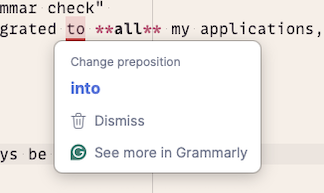
This is not a promotional section: I am adding it because I regularly use and love Grammarly, and in this particular case, it helps in my workflow too.
When I install the Grammarly Desktop App, I get instant feedback on the grammar, tone, and complexity of what I’m writing. Which means, I can fix my errors on the go, instead of having a separate “spelling and grammar check” round. That also saves time. Since it’s a desktop app, it’s integrated into all my applications, including the text editor that I use to write this blog post.
And with the CTRL+G keyboard shortcut, it’s literally one click away.
Grammarly in action.
Use the Source, Luke
As I improve these scripts over time, the latest versions will always be available in this blog’s repository:
All workflow scripts are now organized in the ./hack/ directory:
new-post.sh- Interactive post creationlist-tags.sh- Tag frequency analysismerge-tags.sh- Bulk tag renamingnormalize-tags.sh- Remove duplicate tagsassign-tags.sh- Interactive tag assignmentapply-tags-from-file.sh- Bulk tag applicationfind-posts-without-images.sh- Find posts missing header imagesmove-to-tips.sh- Move posts between sections
The Makefile in the root directory provides convenient shortcuts to all these utilities. Feel free to adapt them to your own workflow.